
About This Firmware
Turn Fingersonic Guitar into a self-contained FM instrument and five-track groovebox. This main2 reference/test application combines live touch-string playing, a step sequencer, a patch editor and a mixer. It is a community experiment, not official product firmware.
SOUND AND SEQUENCING - Eight FM voices, plus synthesized Kick, Snare and Hi-Hat. Audio is generated locally; no SoundFont or sample bank is loaded. - Eight starting patches: Glass EP, Round Bass, Pluck, Bell, Soft Organ, Marimba, FM Brass and Space. - Separate Bass and Lead patches with ratio, FM index, ADSR, Tone and Level editing. - Five tracks: Kick, Snare, Hat, Bass and Lead. Four patterns, each with 16 steps; pattern changes during playback take effect at the next bar. - Tempo 30-300 BPM, Swing 0-60%, track volume/mute, master level and echo. - Quantized live recording. Each melodic track stores one note per step, while live playing supports eight FM voices. - SAVE/LOAD stores patterns, patches and system settings in the dedicated fsg-fm NVS namespace. Existing instrument settings and SF2 resources are not modified.
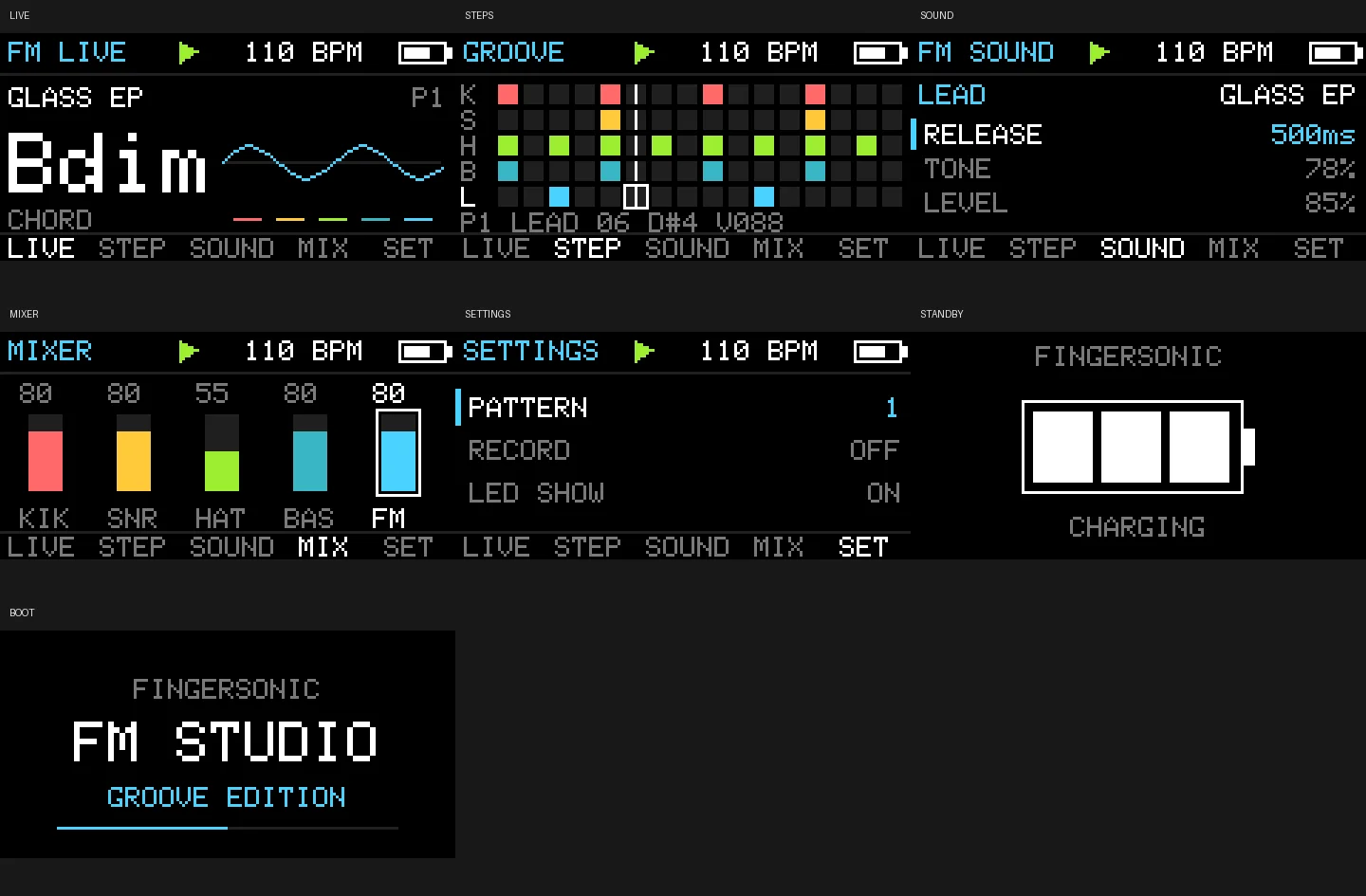
The preview gallery shows the actual LIVE, STEP, SOUND, MIX, SETTINGS and startup/standby layouts rendered on the host from the firmware's drawing code.
Custom firmware demonstration: https://youtube.com/shorts/IivDG06t62U?feature=share The video is an illustration of custom firmware possibilities.
Source code, build instructions and third-party license notices: https://github.com/lastness09/fingersonic-guitar-devkit/tree/main/examples/main2
Installation & Controls
FM STUDIO CONTROLS - Short encoder press: cycle LIVE, STEP, SOUND and MIX. Hold for about 1 second to enter or leave SETTINGS. - Hold the joystick switch for about 1 second: start or stop playback. - LIVE: turn the encoder to choose a Lead preset. A short joystick click toggles recording; hold the joystick switch while turning the encoder to adjust tempo. - Touch strings prepare on press and sound on release. Touch all six to stop playback and mute; release all before playing again. The LIVE joystick's eight directions select C, Dm, Em, F, G, Am, Bdim and G7; center uses open E-A-D-G-B-E notes. - Facing the instrument upright, logo at the top: the left lower Tempo pad plays Kick; the right lower Meter pad plays Snare. The left upper Down pad bends down two semitones; the right upper Up pad bends up two semitones. Holding both centers the bend. - STEP: joystick up/down selects a track; left/right or the encoder selects a step. Click the joystick to toggle that step. Hold it while turning the encoder to edit drum velocity or melodic pitch. - SOUND: joystick up/down selects a parameter and left/right chooses Bass or Lead. Turn the encoder to edit; hold the joystick while turning to select a patch; click to audition. - MIX: select a track with the joystick, turn the encoder for level, click the joystick to mute/unmute. - SETTINGS: navigate with joystick up/down; edit with the encoder or joystick left/right. SAVE/LOAD stores or recalls the song. CLEAR, DEFAULTS and UPLOADER require two joystick confirmations.
Compatibility: Fingersonic Guitar with the existing ESP32-S3 board, 16 MB Flash, OPI PSRAM, ST7735S display and original manufacturer partition layout. This is an experimental community App0 application, not official Fingersonic Guitar firmware or an official recovery image.
WI-FI INSTALLATION 1. Download the application BIN while connected to the Internet. Save any work in your current application first. 2. Enter the preinstalled App1 uploader. From FM Studio or Pea Defense, hold the encoder to open SETTINGS, select UPLOADER with the joystick and confirm twice with the joystick switch. For the original cold-start recovery entry, disconnect charging and fully remove power, then hold the encoder while powering on for at least about 0.5 seconds. A GPIO8 soft-off alone is not a true cold start. 3. Connect your computer to the Fingersonic Wi-Fi hotspot, password 88888888. 4. On Windows or macOS, use FingersonicUploader: https://fingersonic.net/blogs/apps/fingersonicuploader-upload-custom-sounds-to-your-fingersonic Select only the application BIN supplied with this release. Linux users can use the documented App1 HTTP upload interface: curl --fail -F 'file=@Fingersonic_FM_Studio_main2_20261013.bin' http://192.168.4.1/upload 5. Wait for completion and the automatic restart. Replace App0 only; preserve App1, the manufacturer bootloader, the partition layout and filesystem resources.
RETURN TO THE OFFICIAL INSTRUMENT Use the official firmware and sound-bank recovery tool: http://update.fingersonic.cn/FingersonicGuitarUploader/ Prepare the official App0 file while connected to the Internet, then enter App1 and join the Fingersonic hotspot to upload it. Official App0 and the official SF2 bank are separate uploads. These two community applications generate their own sound and leave the existing SF2 bank in place, so returning normally needs only official App0. Re-enter App1 for a separate SF2 restoration if you changed that bank independently.
VALIDATION AND LIMITATIONS The supplied App0 was built with Arduino ESP32 Core 3.3.2. Host regressions execute the actual application logic and drawing code; all included screenshots are host-rendered firmware UI, not photographs or evidence of on-device testing. The host checks passed again on 2026-10-19. Touch response, joystick direction, power transitions and sound still require verification on your own hardware. No SF2 file is required. No Fingersonic App integration or automatic GitHub release synchronization is enabled for these releases.
Website: https://fingersonic.net/ Support: support@fingersonic.net
APPLICATION FILE Fingersonic_FM_Studio_main2_20261013.bin 463840 bytes SHA-256: e7b9dbad7e020bb3eef7b3ec17303de2f0d5f7e5bda09256331e8b8416c75a00
Versions & Release Notes
2026.10.13-preview Latest
Oct 19, 2026 · 453.0 KB · Manual upload
Initial community preview, based on the 2026-10-13 application build. English feature and control guide, host-rendered UI gallery, Wi-Fi installation and official recovery instructions. Host regressions rechecked on 2026-10-19; on-device verification remains required.
SHA-256
e7b9dbad7e020bb3eef7b3ec17303de2f0d5f7e5bda09256331e8b8416c75a00Comments
No comments yet.